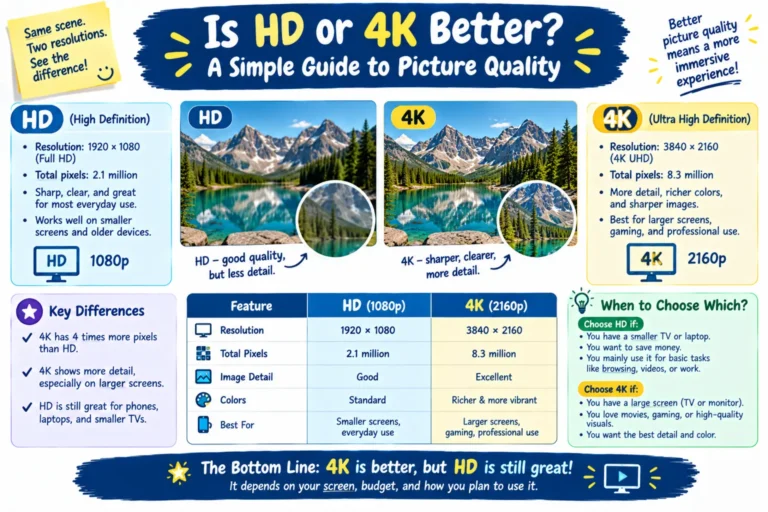
Is HD or 4K better? In most cases, 4K gives you a sharper and more detailed picture than HD. However, 4K is not always the best choice for every viewer.
HD and 4K describe screen resolution. Resolution tells you how many pixels appear on your screen. More pixels can create more visible detail.
A 4K display has much more detail than a standard 720p HD display. It also has four times the pixels of a 1080p Full HD display.
Still, resolution is only one part of picture quality. Screen size, viewing distance, content quality, brightness, contrast, and HDR also matter.
So, should you buy an HD or 4K TV?
The answer depends on how you watch TV, what content you use, and your budget. This guide explains the key differences in simple terms.
Quick Summary
- 4K usually looks sharper than HD.
- 4K UHD commonly uses 3840 × 2160 pixels.
- 720p HD uses 1280 × 720 pixels.
- 1080p Full HD uses 1920 × 1080 pixels.
- 4K has four times as many pixels as 1080p.
- Large screens show the benefits of 4K more clearly.
- You need 4K content to see its full benefit.
- HD can still work well on smaller screens.
- 4K usually costs more than basic HD displays.
- For most new large TVs, 4K is the practical choice.
What Does HD Mean?
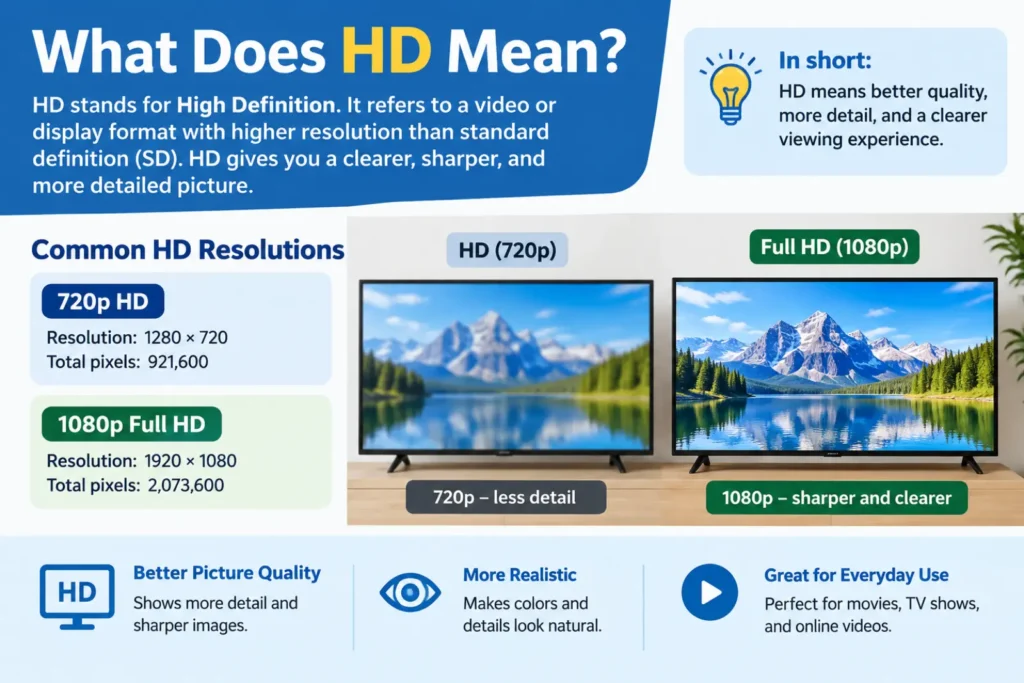
HD means High Definition.
It describes video or display formats with higher resolution than older standard-definition video.
The term HD can refer to different resolutions. Common examples include 1280 × 720 pixels, known as 720p.
Full HD usually means 1920 × 1080 pixels, also called 1080p.
This difference matters when comparing HD with 4K.
A 720p display has about 921,600 pixels. A 1080p display has about 2.07 million pixels.
So, Full HD already provides more detail than basic 720p HD.
What Does 4K Mean?
4K usually refers to 4K Ultra HD, or 4K UHD.
For consumer TVs, 4K UHD commonly uses a resolution of 3840 × 2160 pixels.
That gives the screen more than eight million pixels.
For comparison, a 1080p display has about two million pixels.
This means a 4K display has around four times the pixels of Full HD.
More pixels can show finer details.
For example, you may notice more detail in hair, buildings, landscapes, text, and game graphics.
Is HD or 4K Better for Picture Quality?
If you compare the same content on similar screens, 4K can provide more detail than HD.
The difference becomes easier to see on larger screens.
For example, imagine two 65-inch TVs.
One uses 1080p resolution. The other uses 4K resolution.
The 4K TV can display much more detail because it has more pixels.
However, this does not mean every 4K picture will look better.
A poor-quality 4K video can look worse than high-quality HD content.
The source also matters.
Your TV cannot create perfect detail from a low-quality video source.
HD vs 4K: Comparison Table
| Feature | HD / 720p | Full HD / 1080p | 4K UHD |
|---|---|---|---|
| Resolution | 1280 × 720 | 1920 × 1080 | 3840 × 2160 |
| Approx. pixels | 0.9 million | 2.1 million | 8.3 million |
| Picture detail | Good | Better | Excellent |
| Best for | Small screens | General viewing | Large screens |
| Streaming data needs | Lower | Moderate | Higher |
| Storage needs | Lower | Moderate | Higher |
| Sharpness | Basic | Good | Very high |
| Best use | Budget setups | Everyday viewing | Modern TVs and gaming |
The exact experience also depends on the display panel, video source, viewing distance, and other picture features.
What Is the Difference Between HD and 4K?
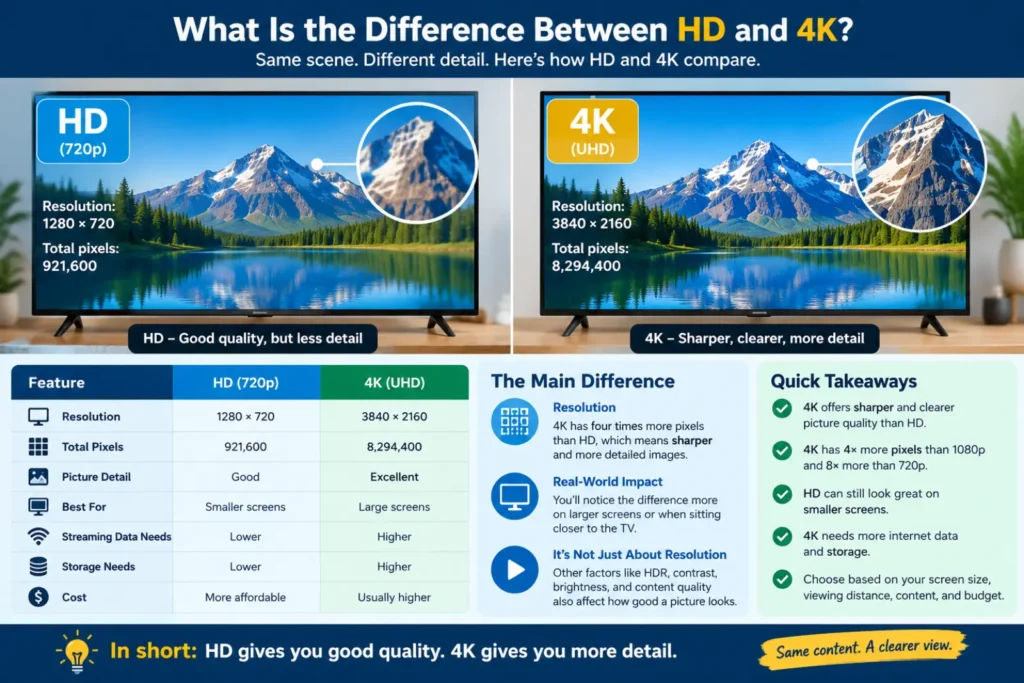
The biggest difference is resolution.
Resolution describes the number of pixels used to create an image.
A 720p HD display has 1280 pixels across and 720 pixels down.
A 4K UHD display has 3840 pixels across and 2160 pixels down.
That creates a major difference in total pixel count.
4K also provides more room for fine details.
This can make small objects look clearer.
Text can appear sharper too.
The difference is often easier to notice when you sit closer to a large screen.
4K vs 1080p: Is 4K Really Better?
Yes, 4K has a higher resolution than 1080p.
A 1080p display uses 1920 × 1080 pixels.
A 4K UHD display uses 3840 × 2160 pixels.
That means 4K has about four times the pixel count of 1080p.
However, the visible difference depends on several factors.
Screen size is important.
Viewing distance also matters.
Content quality matters too.
If you watch low-quality videos from far away, the difference may be small.
If you watch high-quality 4K movies on a large screen, the difference can be much easier to notice.
When Can You Actually See the Difference?
You may notice 4K more on a large screen.
The reason is simple.
A larger screen spreads the image across a bigger viewing area.
Higher resolution can help maintain sharp detail.
The difference can also become clearer when you sit closer.
For example, a large 4K TV can be useful for movies, sports, gaming, and detailed nature videos.
On a small screen, the difference may be less obvious.
This is why buying 4K does not automatically guarantee a dramatic improvement.
Is 4K Better for Gaming?
For gaming, 4K can provide a sharper image.
Games can look more detailed at 4K resolution.
Small objects and distant details may appear clearer.
However, gaming performance depends on more than resolution.
Your console or PC must support 4K output.
The game must also support a suitable resolution.
Your TV or monitor should have features that match your gaming needs.
These can include refresh rate, input response, and supported video signals.
Therefore, do not choose a gaming display based on resolution alone.
Is 4K Better for Watching Movies?
4K can be an excellent choice for movies.
Modern movies can contain a large amount of visual detail.
A large 4K screen can show that detail clearly.
You also need a high-quality source.
A movie streamed at low quality will not suddenly become true high-quality 4K.
If the service provides native 4K content, the display can show its higher resolution.
For movie fans with large screens, 4K can therefore make a noticeable difference.
Is HD Better for Streaming?
HD can still be useful for streaming.
It requires less data than 4K.
That can matter when your internet connection has limited speed or data.
A lower-resolution stream can also use less storage when you download videos.
For casual viewing, HD may provide enough quality.
You may not need 4K for every video.
For example, short social videos may not benefit enough from 4K to justify larger file sizes.
Does 4K Use More Internet Data?
Generally, yes.
Higher-resolution video contains more visual information.
Streaming services may therefore use more data when you select higher video quality.
The exact amount depends on the service, video, compression, frame rate, and streaming settings.
If you have a limited internet plan, HD can be more practical.
If you have a fast connection and enough data, 4K becomes easier to use.
Is 4K Worth It on a Small TV?
It depends on your viewing habits.
On smaller screens, the difference between 1080p and 4K may be harder to notice.
Your viewing distance also changes the answer.
If you sit far from the TV, extra resolution may provide little visible benefit.
If you sit closer, the extra detail may become easier to see.
For this reason, do not buy a 4K TV only because the number sounds better.
Consider screen size, viewing distance, price, and content first.
HD vs 4K for Different Uses
For Movies
4K is useful when you have a large screen and high-quality 4K content.
For Gaming
4K can provide sharper game graphics.
But refresh rate and response performance also matter.
For Sports
4K can show fine details on a large screen.
It can be useful for viewers who sit relatively close.
For Regular TV
HD may still be enough for many channels and everyday programs.
For YouTube
The best option depends on the video and your internet connection.
Many videos are available in multiple resolutions.
For Work
4K can provide more desktop space and sharper text.
This can help when working with documents, images, or large spreadsheets.
Common Mistakes When Choosing HD or 4K
Mistake 1: Assuming 4K Always Looks Better
Resolution is important, but it is not everything.
Panel quality and content quality also affect the image.
Mistake 2: Ignoring Viewing Distance
You may not see much difference if you sit far away.
Think about your room before choosing a screen.
Mistake 3: Buying 4K Without 4K Content
A 4K screen cannot turn every source into native 4K.
Upscaling can improve some content, but it is not the same as native 4K.
Mistake 4: Ignoring Internet Speed
Streaming 4K can require more bandwidth.
Check your connection before choosing higher streaming quality.
Mistake 5: Comparing Only Resolution
Do not compare TVs using resolution alone.
Look at brightness, contrast, HDR support, refresh rate, panel type, ports, and software.
How to Choose Between HD and 4K
Ask yourself five simple questions.
1. How large is the screen?
Large screens can make higher resolution more useful.
2. How far do you sit from the screen?
Your viewing distance affects how much detail you can see.
3. What content do you watch?
Check whether your favorite services provide 4K content.
4. How fast is your internet connection?
4K streaming generally needs more data than HD.
5. What is your budget?
If you have a limited budget, compare the complete display rather than resolution alone.
HD or 4K: Which One Should You Buy?
For a new large TV, 4K is usually the more practical resolution.
It offers much more detail than 720p HD.
It also offers four times the pixels of 1080p Full HD.
However, your needs still matter.
A smaller secondary TV may not need 4K.
A limited internet connection may also make HD more practical.
For a main living-room TV, 4K can make sense when the screen is large.
For a basic bedroom TV, HD may be enough.
The right choice depends on how you use the display.
What About 4K HDR?
4K and HDR are different technologies.
4K describes resolution.
HDR describes high dynamic range.
HDR can improve the range between dark and bright areas.
It can also improve the way colors and highlights appear.
Therefore, do not assume that 4K alone determines picture quality.
A good display can combine 4K resolution with HDR and other picture technologies.
This can produce a stronger overall viewing experience.
Expert Insights: What Really Matters?
A useful way to compare displays is to look beyond the resolution number.
First, check the actual content you watch.
Second, consider the screen size.
Third, consider your normal viewing distance.
Then check important display features.
These can include contrast, brightness, HDR support, refresh rate, and color performance.
Also check the ports and supported formats.
This matters especially for gaming consoles, PCs, and streaming devices.
Google’s current guidance also emphasizes useful, reliable, people-first content instead of writing for search engines alone.
For technology content, clear explanations and accurate specifications help readers make informed choices.
HD vs 4K: Real-Life Examples
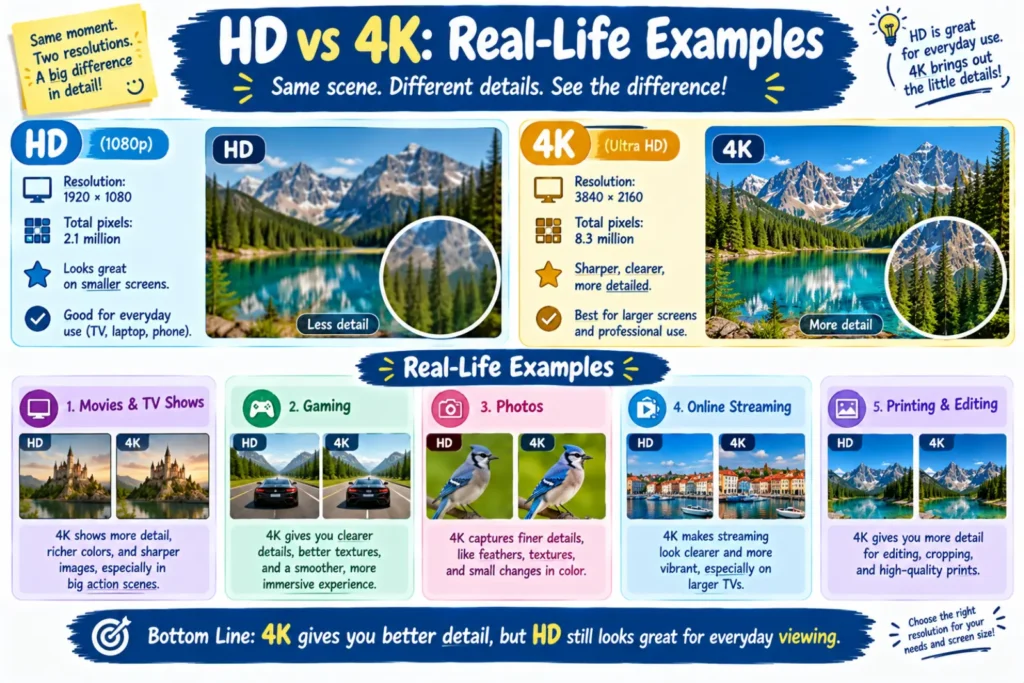
Example 1: Small Bedroom TV
You have a 32-inch TV.
You sit several feet away.
You mainly watch regular TV channels.
In this case, HD may be enough for your needs.
Example 2: Large Living Room TV
You have a 65-inch TV.
You watch movies and sports.
You also use streaming services with 4K content.
Here, 4K can make more sense.
Example 3: Gaming Setup
You use a modern console with 4K support.
You sit fairly close to a large screen.
You play visually detailed games.
A 4K display can provide a sharper image.
Example 4: Limited Internet
Your internet plan has limited data.
You mainly watch casual videos.
HD may be a more practical choice.
HD vs 4K Synonyms and Related Terms
You may see these terms when shopping for a TV or monitor:
- HD
- High Definition
- 720p
- Full HD
- 1080p
- Ultra HD
- UHD
- 4K
- 2160p
- 4K UHD TV
- 4K resolution
- HD resolution
- screen resolution
- display resolution
- picture quality
- TV resolution
- 4K streaming
- HD streaming
Understanding these terms makes TV specifications easier to compare.
Frequently Asked Questions
Is 4K better than HD?
Yes, 4K provides higher resolution and more pixels than HD. It can show more fine detail, especially on larger screens.
Is 1080p HD or 4K?
1080p is Full HD, not 4K. A 4K UHD display commonly uses 3840 × 2160 pixels.
Is 4K worth it over 1080p?
It can be worth it for large screens and high-quality content. The benefit depends on screen size and viewing distance.
Can you tell the difference between HD and 4K?
You often can, especially on larger screens and when viewing high-quality content from a suitable distance.
Does 4K use more internet data?
Generally, yes. Higher-resolution streaming usually requires more data than lower-resolution streaming.
Is 4K better for gaming?
4K can provide sharper game images. However, refresh rate, response time, and gaming support also matter.
Is HD good enough for a TV?
Yes. HD can still work well for smaller screens, basic viewing, and some budget setups.
Should I buy a 4K TV in 2026?
For a new main TV, 4K is a practical resolution to consider. Check the screen size, content, features, and price before buying.
Conclusion
Is HD or 4K better? For pure resolution and image detail, 4K is better than HD.
A 4K UHD display commonly has 3840 × 2160 pixels. That is far more detail than 720p HD. It also has about four times the pixels of 1080p Full HD.
Still, 4K is not automatically the right choice for everyone.
Think about your screen size and viewing distance.
Consider the content you watch most often.
Check your internet connection if you stream video.
Also compare features such as HDR, brightness, contrast, and refresh rate.
For a large main TV, 4K is often the practical choice today.
For a small screen or basic setup, HD can still meet your needs.
The simple takeaway is this: 4K gives you more detail, while HD can offer enough quality at a lower cost and data use.
Choose the resolution that fits how you actually watch and use your screen.