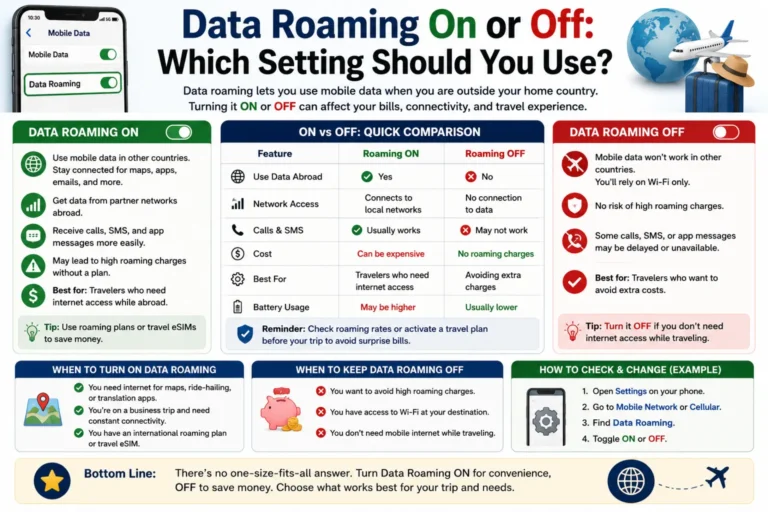
Data roaming on or off is an important setting to understand before you travel. It controls how your phone uses mobile data when it connects to another network. This setting can help you stay connected while traveling outside your carrier’s normal coverage. However, it can also lead to extra charges if your mobile plan has expensive roaming rates.
Many people turn data roaming on without checking their carrier’s rules first. Others keep it off and wonder why mobile internet stops working abroad. Understanding this setting can help you avoid both problems.
In simple terms, data roaming allows your phone to use mobile data through a different network. This often happens when you travel to another country. Your carrier may connect your phone to a local partner network.
Whether you should turn data roaming on or off depends on your mobile plan. It also depends on where you are traveling and how you want to use your phone. Some plans include international roaming, while others charge separate fees.
This guide explains data roaming on or off in simple terms. You will learn when to turn it on, when to keep it off, how roaming charges work, and what alternatives you can use while traveling.
Quick Summary
- Data roaming ON lets your phone use mobile data on another network.
- Data roaming OFF blocks mobile data while roaming.
- Keep roaming OFF when you do not need mobile data abroad.
- Turn roaming ON when your plan supports roaming and you need mobile data.
- Wi-Fi usually works even when data roaming is off.
- Roaming charges depend on your mobile carrier and plan.
- Check your carrier’s roaming policy before international travel.
- An international SIM or eSIM can reduce roaming costs.
What Does Data Roaming Mean?
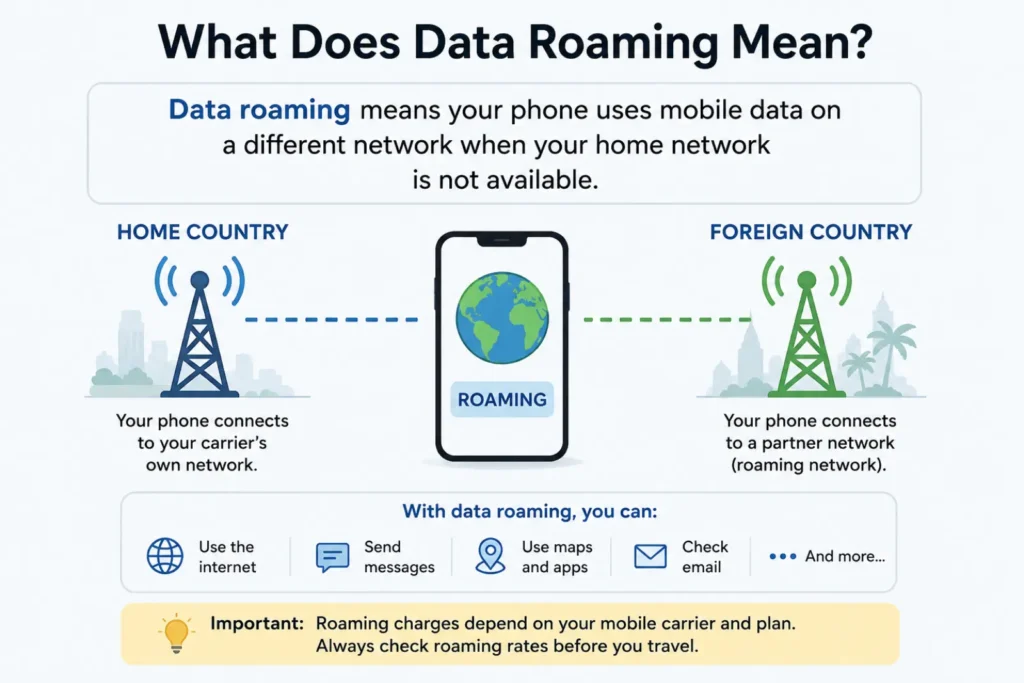
Data roaming means your phone uses a mobile network outside your normal carrier network.
Your carrier may have agreements with other networks. These agreements let your phone stay connected when your own network is unavailable.
For example, imagine you use a Pakistani mobile network. You travel to another country. Your home carrier may connect your phone to a local partner network.
Your phone can then access mobile data through that network.
That process is called data roaming.
Roaming can support internet access, maps, messaging apps, email, and other online services.
However, roaming terms vary between carriers. Some plans include roaming at no extra cost. Others charge separate fees.
Always check your plan before using roaming abroad.
Data Roaming On or Off: What Is the Difference?
The main difference is simple.
When data roaming is ON, your phone can use mobile data through another network when your normal network is unavailable.
When data roaming is OFF, your phone blocks mobile data through roaming networks.
| Setting | What happens | Best for |
|---|---|---|
| Data roaming ON | Mobile data can work on partner networks | Travelers with roaming included |
| Data roaming OFF | Roaming mobile data stays blocked | Avoiding unexpected charges |
| Wi-Fi ON | Internet works through Wi-Fi | Hotels, homes, cafés, airports |
| Mobile data OFF | Cellular internet stays off | Maximum data control |
Your phone may still connect to a network for calls or texts when data roaming is off. This depends on your carrier and phone.
When Should Data Roaming Be ON?
Turn data roaming on when you need mobile internet outside your carrier’s normal coverage.
This often happens during international travel.
You might need roaming for:
- Google Maps or other navigation apps
- Messaging apps
- Online tickets
- Travel apps
- Ride-booking services
- Emergency information
- Translation tools
First, confirm that your mobile plan supports roaming.
Some carriers offer travel passes. Others include international data in selected plans.
If your plan includes roaming, turning the setting on can help you stay connected.
When Should Data Roaming Be OFF?
Keep data roaming off when you do not need cellular internet outside your home network.
This setting can help prevent unexpected roaming data charges.
It can also help you control background data use while traveling.
For example, your apps may download updates automatically. Photos may sync to the cloud. Social media apps may refresh content.
Those activities can consume mobile data without you noticing.
Keeping roaming off removes that risk from roaming mobile data.
You can still use Wi-Fi when available.
Should Data Roaming Be On or Off at Home?
For most people, data roaming should be off at home if their normal carrier provides coverage.
Your phone normally uses your carrier’s own network. Therefore, roaming does not provide a benefit in most everyday situations.
However, special cases exist.
Some carriers use partner networks in certain areas. Your phone may classify that connection as roaming.
Your carrier’s terms matter more than the setting alone.
If you are unsure, check your carrier’s support page or mobile plan details.
Should Data Roaming Be On or Off Abroad?
The answer depends on your mobile plan.
If your carrier includes international roaming, you can usually turn roaming on.
If your carrier charges high roaming rates, keeping it off may save money.
You could instead use:
- Local SIM cards
- Travel eSIMs
- Hotel Wi-Fi
- Public Wi-Fi
- An international mobile plan
Before traveling, check your destination, supported networks, prices, and data limits.
Do not assume that every international plan works in every country.
Real-Life Examples
Example 1: Traveling With a Roaming Plan
You travel abroad and your carrier includes international data.
You need maps and messages while sightseeing.
In this case, turn data roaming ON.
Your phone can use the supported partner network.
Example 2: Traveling Without Roaming Coverage
You travel abroad but your plan does not include roaming.
You want to avoid extra charges.
Keep data roaming OFF.
Use Wi-Fi or another suitable mobile plan instead.
Example 3: Using a Travel eSIM
You install a travel eSIM before your trip.
The eSIM provides mobile data in your destination country.
You may keep your main SIM’s roaming off while using the travel eSIM for data.
Your phone’s exact settings depend on the device.
Example 4: Using Hotel Wi-Fi
You stay at a hotel with Wi-Fi.
You only need internet inside the hotel.
You can keep data roaming off and use Wi-Fi instead.
Does Turning Data Roaming Off Save Money?
It can help prevent roaming data charges.
However, the exact savings depend on your carrier and plan.
Data roaming itself does not always cost extra. Some modern plans include roaming.
The important point is this:
Check the price before using roaming data.
A small amount of background data can sometimes create charges under expensive roaming plans.
You should also check whether your carrier offers daily passes or data limits.
What Happens If Data Roaming Is Off?
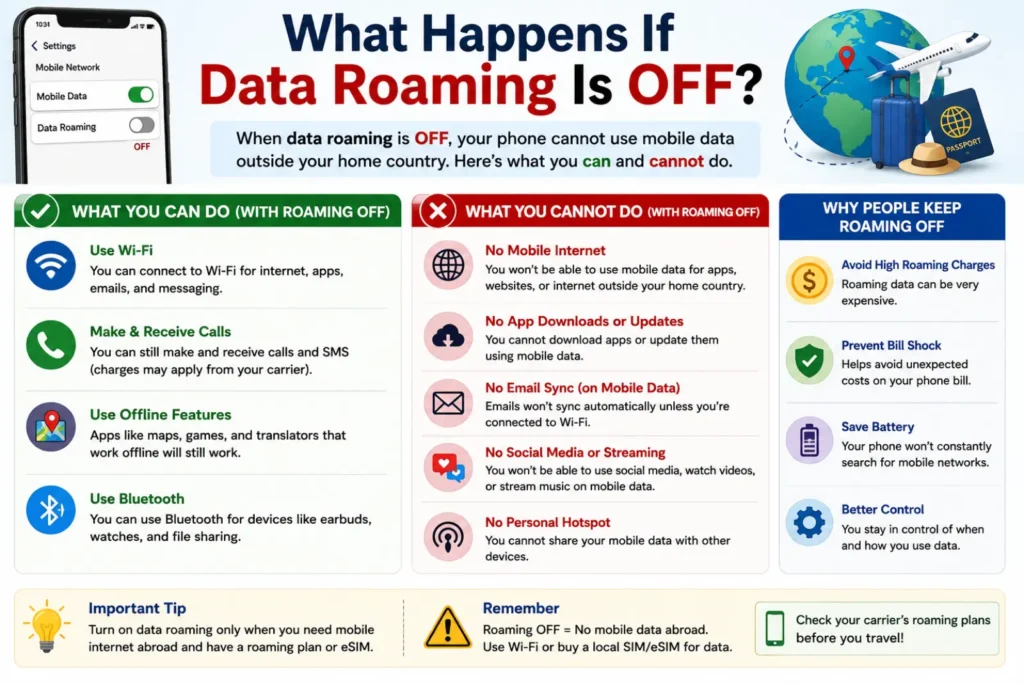
Your phone cannot use mobile data through roaming networks.
That means apps may lose cellular internet when your normal network is unavailable.
You may still have access to Wi-Fi.
Calls and text messages can behave differently. Their availability depends on your carrier, phone, and roaming agreement.
Therefore, data roaming off does not always mean your entire phone becomes offline.
It mainly controls mobile data while roaming.
Common Data Roaming Mistakes
Many travelers make simple mistakes with roaming settings.
1. Assuming roaming always costs money
Some plans include roaming.
Others charge extra.
Always check your plan.
2. Turning roaming on without checking prices
This can create unexpected charges.
Check roaming rates before travel.
3. Forgetting background data
Apps can use data even when you are not actively using them.
Review background data settings before traveling.
4. Assuming Wi-Fi is always safe
Public Wi-Fi can have security risks.
Use trusted networks and avoid sharing sensitive information on unknown networks.
5. Forgetting to check the correct SIM
Dual-SIM phones can use different lines for mobile data.
Confirm which SIM handles cellular data.
6. Leaving roaming on after a trip
You may not need it once you return home.
Review the setting when you get back.
Tips for Using Data Roaming Safely
Follow these simple tips before traveling.
- Check your carrier’s roaming policy.
- Confirm your destination is covered.
- Check data limits and prices.
- Consider a travel eSIM.
- Download offline maps before your trip.
- Turn off automatic app updates if needed.
- Monitor your mobile data use.
- Use trusted Wi-Fi networks.
- Check your phone’s dual-SIM settings.
- Turn roaming off when you no longer need it.
These steps can help you stay connected while controlling your data use.
Data Roaming vs Mobile Data
These settings are related but different.
Mobile data controls whether your phone uses cellular internet.
Data roaming controls whether your phone can use cellular data through another network.
Think of it this way:
- Mobile data = Can I use cellular internet?
- Data roaming = Can I use cellular internet on another network?
You may need both settings enabled for roaming data to work.
The exact behavior can vary by phone and carrier.
Data Roaming vs Wi-Fi
Wi-Fi uses a wireless internet connection from a router or hotspot.
Data roaming uses a mobile network outside your normal carrier network.
| Feature | Data Roaming | Wi-Fi |
| Uses mobile network | Yes | No |
| Works without Wi-Fi | Yes | No |
| Can involve roaming fees | Yes | Usually not from your carrier |
| Works while traveling | Often | Only where Wi-Fi exists |
| Good for navigation outdoors | Yes | Not always |
Wi-Fi can reduce cellular data use.
However, you should use trusted Wi-Fi networks whenever possible.
Synonyms and Related Search Terms
People use several phrases when searching for this topic.
Useful semantic keywords include:
- data roaming meaning
- data roaming setting
- data roaming explained
- should data roaming be on
- should data roaming be off
- mobile data roaming
- international data roaming
- roaming data charges
- phone roaming settings
- data roaming abroad
- roaming while traveling
- international mobile data
- travel eSIM
- roaming fees
- mobile data while abroad
These terms describe closely related search intent.
Expert Insights: How to Avoid Roaming Problems
A simple rule works well:
Never turn roaming on before checking your mobile plan.
Your carrier controls roaming prices and coverage.
Your phone only provides the setting.
For frequent travelers, compare roaming passes, local SIMs, and travel eSIMs.
Also check your phone’s data usage before leaving home.
This gives you a useful baseline.
You should also download important travel information before departure. Offline maps and saved documents can reduce your need for mobile data.
Finally, remember that roaming settings differ between Android phones and iPhones.
Always check your device’s current instructions.
How to Turn Data Roaming On or Off
The exact steps depend on your phone.
On many Android phones
Open Settings.
Then look for:
Network & Internet → Mobile Network → Data Roaming
Switch the option on or off.
The menu name can vary by Android version and phone brand.
On iPhone
Open Settings.
Then select:
Cellular or Mobile Service → Cellular Data Options → Data Roaming
Turn the option on or off.
If you use two SIMs, check which line handles mobile data.
FAQs About Data Roaming On or Off
Should data roaming be on or off?
Keep it off unless you need roaming mobile data. Turn it on when your plan supports roaming and you need cellular internet.
Does data roaming cost money?
It can. Some plans include roaming, while others charge extra fees. Check your carrier before using it.
Should I turn data roaming off when traveling?
Turn it off if you do not have affordable roaming coverage. You can use Wi-Fi or another mobile data option.
Can I use Wi-Fi with data roaming off?
Yes. Data roaming controls cellular data through roaming networks. Wi-Fi can still work.
Will my phone work if data roaming is off?
Your phone can still use Wi-Fi. Calls and texts may also work, depending on your carrier and plan.
Is data roaming the same as mobile data?
No. Mobile data controls cellular internet generally. Data roaming controls cellular data on another network.
Should data roaming be on for international travel?
Only if your carrier supports affordable roaming in your destination. Otherwise, consider Wi-Fi, a local SIM, or a travel eSIM.
Does turning off data roaming stop all roaming charges?
It blocks roaming mobile data. Other roaming services, such as calls or texts, may have separate charges.es like “click here.”
Conclusion
Data roaming on or off depends mainly on your carrier, plan, and location.
Keep data roaming off when you want to avoid roaming data use.
Turn it on when your plan supports roaming and you need mobile internet abroad.
Before traveling, always check roaming prices and coverage.
You should also consider travel eSIMs, local SIMs, and trusted Wi-Fi.
Remember that mobile data and data roaming are different settings.
Mobile data controls cellular internet. Data roaming controls cellular data through another network.
The safest approach is simple. Check your plan first, then choose the setting.
If you do not need roaming data, keeping it off can prevent unwanted data use.